WBS: from weighbridge to weighing ticket, without retyping anything
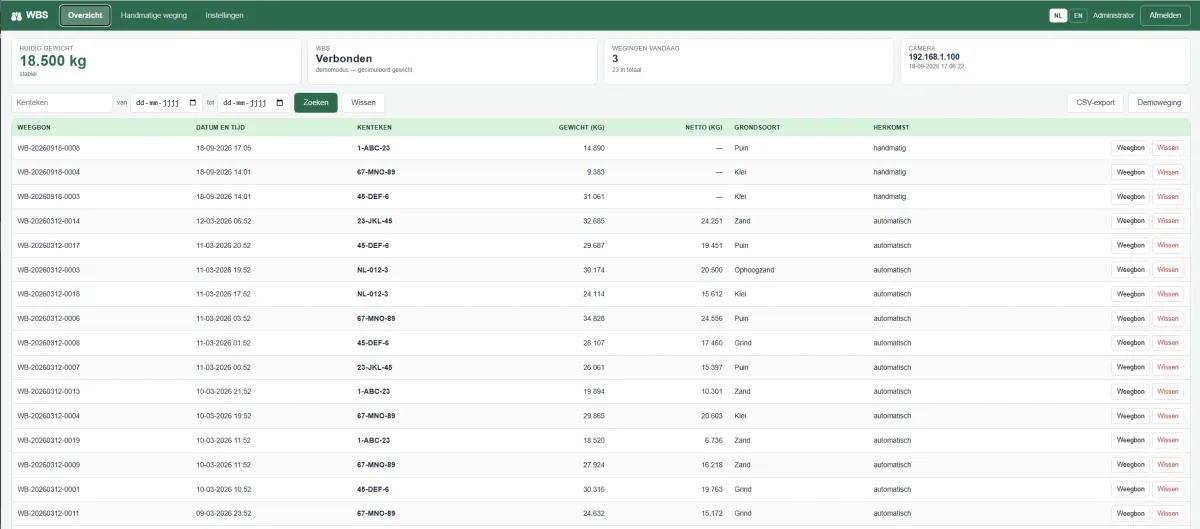
For companies with their own weighbridge we developed WBS. The system reads the truck's number plate, picks up the weight from the weighbridge, photographs the vehicle and turns all of that into a weighing ticket with its own ticket number. The operator simply works in a browser: on the touchscreen beside the bridge, on a tablet, or on the office PC.
Anyone running a weighbridge knows the daily routine: a truck drives onto the bridge, someone notes the number plate, looks at the display and copies the weight onto a ticket. Every transcription is a moment where a digit can slip — and afterwards it is usually impossible to establish which vehicle was actually on the bridge.
WBS takes that work over. The system records the weighing itself, complete with number plate, time, photo and ticket number, and delivers the weighing ticket as a PDF. What is left for the operator is to check it and wave the truck on.
From arrival to ticket
The plate camera at the barrier reads the number plate of the arriving vehicle. At that same moment WBS picks up the weight from the weighbridge and photographs the vehicle. As soon as the weight is stable — while the truck is still settling, nothing is recorded — WBS stores the weighing with its own ticket number, which runs on per day.
And when there is no camera
Not every trip passes the camera. The operator can also enter a weighing by hand: number plate, weight, material type and a remark, with the weight fetched straight from the weighbridge at the press of a button. For vehicles that arrive full and leave empty, WBS keeps gross, tare and net, and works out the net weight itself.
The ticket and the overview
The weighing ticket is a PDF with your company details at the top, the ticket number in view, the weighing data in a table and the photo of the vehicle below it. In the overview you filter by number plate and date range, open any ticket with one click, and export the whole selection as a CSV file for the bookkeeping.
With a photo — or without
A weighing ticket with a photo of the vehicle is a very different document afterwards than one without. Where that image comes from depends on the site: the camera that is already there, a separate webcam by the bridge, or the tablet in the operator's hand. And where no photo is needed, the step is simply left out. It is a setting, not a rebuild.
Dutch and English, right down to the ticket
WBS is bilingual, and that carries through to the weighing ticket and the export. A Dutch ticket writes 18-09-2026 and 31.061 kg; an English one writes 18/09/2026 and 31,061 kg. Useful on sites where the driver reads one language and the client's back office the other.
Getting started
Nothing has to be installed on the workstations — the operator works in a browser. Signing in is done with a personal user name and password, permissions are set per user, and deleting a weighing is reserved for an administrator. Settings such as company details and camera can be changed while the system keeps running.
There is also a demo mode, so the system can be set up and demonstrated before the hardware is in place. The screen clearly states that demo mode is on, so nobody mistakes a demo weighing for a real one. If you are coming from an existing system, we bring the existing weighings and photos across, keeping the original ticket numbers.
Custom-built to fit what is already there
WBS is built in Delphi and connects to the weighing equipment already on site. On the roadmap: control of the barrier and the traffic light.
Wondering whether this fits your site? Get in touch — we would be glad to show you the system.
